Table of Contents
- How to Choose a 3D Printing Service in 2026
- 3D Printing Service Cost: What Drives Your Quote
- 3D Printing Materials: Plastics, Resins, and Metals
- 3D Printing Turnaround Time: From File to Door
- 3D Printing File Requirements: Get Your Design Ready
- Quality Assurance: Specs That Matter When You Order
- Prototyping and Production: Matching the Service to the Job
- Frequently Asked Questions
Last Updated: October 20, 2026
How to Choose a 3D Printing Service in 2026
Choosing a 3D printing service starts with matching the process to your part, then verifying the provider can prove it.
The distinction matters because additive manufacturing covers several processes with different strengths. FDM builds parts by laying down melted thermoplastic layer by layer.
Below, we break down what drives a quote, which material fits your job, and how to vet a provider before you commit.
3D Printing Service Cost: What Drives Your Quote
Most quotes come down to four variables: material volume, machine time, support removal, and finishing. A part that fills the build chamber costs more than a small bracket, and a resin part with a mirror-smooth finish costs more than a raw FDM print. But the number on the quote is the output of a pricing model, and understanding that model is how you compare providers fairly.
The Six Cost Drivers, in Order of Impact
- Process. FDM is usually the least expensive per part for functional prototypes. SLA and MSLA sit in the middle for small, detailed parts. SLS and MJF cost more per unit but spread across a full build chamber, so per-part price drops sharply with quantity. Metal powder-bed fusion is the most expensive process and is priced more like machining than like plastic printing.
- Material. Commodity thermoplastics such as PLA and PETG are the cheapest feedstock. Engineering grades such as polycarbonate, nylon, and PEKK cost more per cubic inch and often require tuned machine profiles. Resins vary widely by formulation, and metal powders are priced by alloy and are typically the dominant cost in a metal part.
- Part size and build orientation. Price tracks the bounding box of the part plus the support structure, not just the solid volume. A tall, thin part can consume more machine time than a compact, dense one. Orientation also changes support volume and surface finish on downward-facing surfaces.
- Quantity and nesting. Ten small parts often cost far less per unit than one, because setup and machine time spread across the batch and parts nest into the same build. Ask how a provider prices a batch versus a single unit, and you will quickly learn whether they think in production terms or one-offs.
- Post-processing. Support removal is often included; sanding, dyeing, vapor smoothing, polishing, and painting are usually line items. Each step adds labor and handling time, and hand-finishing is where quotes diverge most between shops.
- Turnaround and shipping. Rush scheduling is typically the largest add-on. Shipping is priced on dimensional weight, so bulky, low-density parts can cost more to ship than their material cost.
Example Scenarios You Can Compare
Use these as a mental model, not as a price list, actual quotes vary by provider, region, and current machine load. The point is the ratio between scenarios, which is what you should sanity-check against any quote you receive.
- One small FDM bracket, commodity plastic, standard turnaround. Lowest absolute cost. Setup and minimum-order fees dominate the quote, so the per-part price is high relative to the material used.
- The same bracket at quantity 50. Per-unit price typically falls by half or more because setup amortizes and parts nest. If a provider's 50-unit quote is not meaningfully cheaper per unit than the single-unit quote, ask why.
- A small resin part with a smooth finish. Material cost is low, but polishing and inspection add labor. The finishing line often exceeds the print line.
Hidden Fees and What to Ask Upfront
The surprise charges usually hide in four places: minimum order fees, setup charges, post-processing, and shipping. Get each one in writing before you approve.
- Minimum order fee: charged when your job is too small to fill a build
- Setup and file prep: some shops charge to repair or orient your model
- Post-processing: support removal, sanding, dyeing, or vapor smoothing
Our rule at Black Creek Works is simple: the quote you receive is the quote you pay. Ask every provider whether their number is all-in.
3D Printing Materials: Plastics, Resins, and Metals
Material choice decides strength, finish, and how long your part lasts. Thermoplastics like PLA print easily and hold fine detail, which suits display models and prototypes.
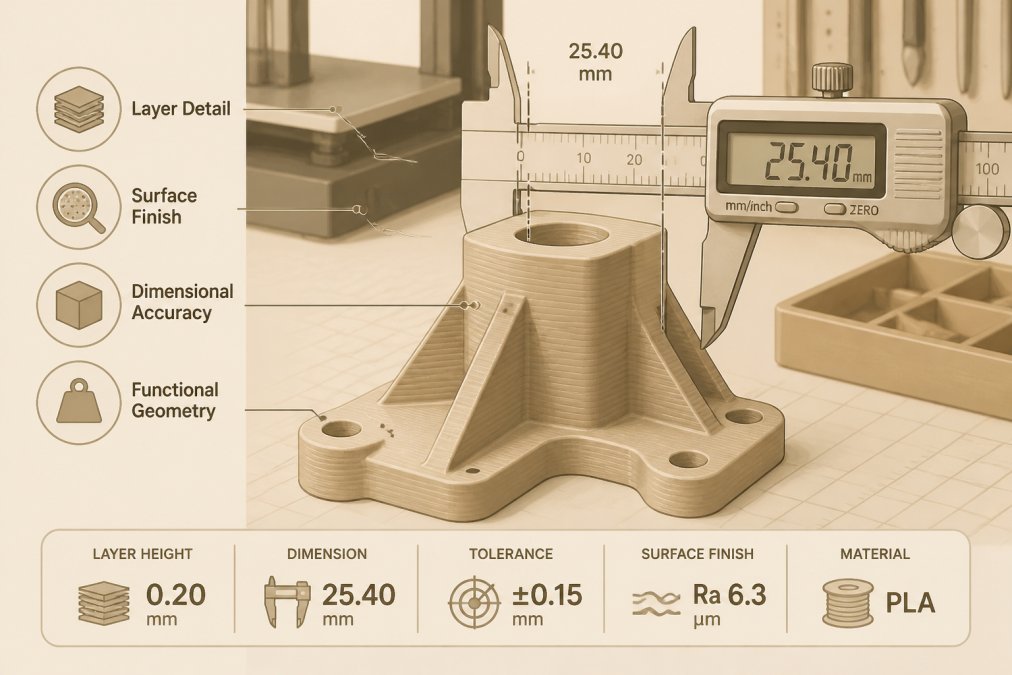
Material selection is where most projects succeed or fail. Pick for the load the part will carry, not for the cheapest option on the list.
Material Trade-offs: Strength, Finish, and Sustainability
Every material trades something away. PLA is easy to print and compostable in industrial conditions, but it softens under heat. Polycarbonate is tough and dimensionally stable, yet harder to finish cleanly.
On sustainability, ask providers about material sourcing and waste handling. Powder-based processes reuse unfused powder, while resin printing generates more waste per part. If eco-friendly materials matter to your project, say so early.
3D Printing Turnaround Time: From File to Door
Turnaround depends on queue depth, process, and finishing, not just print speed. A simple FDM part might ship in a day or two. A resin part needing polishing, or a metal part needing stress relief, takes longer. Always confirm the clock starts when the file is approved, not when you send it.
Local vs. Online: Delivery and Total Cost
Local providers win on speed and conversation. You can hand off a part, discuss a tolerance issue face to face, and pick up the same week.
Compare total cost, not sticker price. Add shipping, rush fees, and the cost of a reprint if the first part fails. A local partner that gets it right the first time often beats a cheaper online quote that ships twice.
3D Printing File Requirements: Get Your Design Ready
A clean, watertight file prevents most delays. Export as STL or STEP, check that your model has no holes or flipped normals, and confirm your units are set correctly before upload. Thin walls below your process minimum will fail, so check the provider's design guidelines first.
File Formats: Which One to Send
- STL is the most widely accepted format and stores surface geometry only. It carries no units, no material, and no feature history, so a provider cannot tell whether your model is in millimeters or inches unless you tell them. STL is fine for organic shapes and simple parts.
- STEP is preferred for engineering parts. It preserves exact geometry, units, and features, and it lets the provider re-tessellate the model for the target process. If your CAD system can export STEP, send STEP.
- 3MF carries units, materials, and orientation metadata and is increasingly accepted. It is the best choice when you want the provider to see your intended build orientation.
If you are unsure, send STEP and STL together and tell the provider which one is authoritative.
Design-for-Additive Rules That Prevent Failed Builds
Additive manufacturing has its own design rules, and a model designed for machining will often fail at the printer. The specific minimums vary by process and material, so confirm them against the provider's published design guidelines before you upload.
- Wall thickness. Each process has a minimum printable wall. Below it, the wall may not form or may warp. FDM and resin processes generally tolerate thinner walls than powder-bed processes, but the exact minimum depends on material and orientation.
- Minimum feature size. Pins, slots, and text have a minimum legible size per process. Fine text that reads in CAD may disappear in the print.
- Tolerances. State the tolerance your part actually needs. Over-tight tolerances raise cost because they force slower builds, more inspection, or secondary machining. Match the tolerance to the process capability rather than defaulting to the tightest number.
Common Upload Errors and How to Catch Them
- Non-manifold geometry. Edges shared by more than two faces, or zero-thickness surfaces, confuse the slicer. Run a mesh repair check before upload.
- Flipped normals. Inside-out faces make the slicer treat the interior as exterior. Most CAD and mesh tools can recalculate normals.
- Wrong units. A model exported in inches but read as millimeters prints at roughly 1/25th scale. Confirm units in the file or in your message to the provider.
- Self-intersections. Overlapping solids that were never booleaned can produce unpredictable results. Union overlapping bodies before export.
Pre-Upload Checklist
- Model is watertight with no self-intersections
- Wall thickness meets the process minimum
- Units are set to millimeters or inches, not scaled
- Tolerances match the process capability
A common mistake is submitting a model designed for machining. Additive manufacturing has its own rules, and a provider who flags design issues early saves you a failed build. Ask whether the provider runs an automated DFAM check on upload and whether a human reviews the file before the build starts, that review is where most costly errors are caught.
Quality Assurance: Specs That Matter When You Order
Ask for measurable specifications, not assurances. A serious provider states their achievable tolerance, layer height range, and surface finish in numbers. For critical parts, request a first-article inspection or dimensional report with the shipment.
Precision and accuracy are different things. Precision is repeatability; accuracy is how close you land to the nominal dimension. Ask which one the provider guarantees on your part.
Prototyping and Production: Matching the Service to the Job
Prototyping favors speed and iteration. You want fast turnaround, low cost per revision, and a provider who will print one part, then another, without treating each as a fresh setup.
Match the service to the stage. Use a prototyping service to prove the design, then move to a production service once the geometry is frozen. Black Creek Works provides precision manufacturing services, including 3D printing, CNC milling, and laser engraving.
Frequently Asked Questions
How much does a 3D printing service cost?
Cost depends on material, part size, complexity, and quantity. Most services quote based on volume of material, machine time, and post-processing. For a like-for-like comparison, ask for a breakdown of material, setup, and finishing fees. Black Creek Works provides a free quote with no hidden costs, so you can see exactly what drives the price before you commit.
What materials can a 3D printing service use?
Common 3D printing materials include thermoplastics like PLA, PETG, and polycarbonate; resins for high-detail parts; and metals such as aluminum and stainless steel. The choice affects strength, finish, and cost. For functional prototypes, polycarbonate offers durability, while PLA is ideal for visual models. Always confirm the material grade and available colors with your provider.
How long does it take to get a 3D-printed part?
Turnaround time varies by process and provider. Simple FDM parts can ship in 1-3 business days, while SLA or metal printing may take 5-10 days. Factors include file review, machine queue, and post-processing. Ask about rush options and tracking. Black Creek Works offers fast turnaround for many projects and will confirm lead time in your quote.
What file requirements do I need for a 3D printing service?
Most services accept STL, STEP, or OBJ files. Ensure your model is watertight, has correct units (mm), and includes all necessary details. For tight tolerances, provide a 2D drawing with critical dimensions. Check wall thickness and minimum feature size against the service's guidelines. Black Creek Works reviews files before printing to catch issues early.
Picking a 3D printing service is a decision about trust as much as capability. You need a partner who quotes honestly, hits tolerances, and answers the phone when a part fails. Black Creek Works is a veteran-owned, family-operated shop offering 3D printing, CNC milling, and laser engraving, with customization options and fast turnaround on custom projects. Get started with Black Creek Works and turn your next design into a finished part.